docs.unavlab.com
Main ❯ Navigation & tracking systems ❯ RedWave: User’s manual
 |
|
|---|---|
| www.unavlab.com support@unavlab.com |
RedWave - underwater acoustic navigation system User’s manual |
RedWave
User’s manual
Contents
- 1. Introduction
- 2. System composition
- 3. Effective deployment of a long navigation base
- 4. Troubleshooting
- 5. Obligations and disclaimer
1. Introduction
The underwater acoustic navigation system RedWave is designed to provide various underwater objects in the submerged state with navigation data (absolute geographic coordinates and depth):
- remotely operated underwater vehicles (ROVs);
- human-occupied vehicles (HOVs);
- autonomous unmanned underwater vehicles (AUVs);
- recreational and technical divers (when the devices in the diver version are used).
The operating principle of the RedWave system is similar to that of the global satellite navigation systems GPS, GLONASS and the like. The main difference is that the role of navigation satellites is played by small floating buoys RedBase - repeaters of the satellite navigation signal. The geographic coordinates are computed directly on the navigation receiver, which is an acoustically passive device. This system architecture makes it possible to provide navigation data simultaneously to an unlimited number of navigation receivers with the support of a single set of buoys in one operating area.
The RedWave system uses modern digital broadband acoustic communication technology, and the signal used is specially designed for difficult hydrological conditions, including those typical of shallow water bodies.
CAUTION! The RedWave system uses satellite navigation systems as the source of navigation information for positioning the relay sonobuoys, therefore, when satellite navigation signals are being jammed or spoofed, RedWave cannot operate.
2. System composition
2.1. RedBase - GNSS-equipped sonobuoy
Regardless of the objects being positioned - divers or robots - the RedWave system always includes 4 GNSS-equipped sonobuoys RedBase.
2.1.1. General information
The relay sonobuoys RedBase are designed to form a long navigation base in the operating area, with the support of which the diver’s navigation receivers RedNav and/or the integrated navigation receivers RedNode operate.
The long navigation base is formed by four RedBase buoys. Each set of buoys contains four buoys with sequence numbers (addresses) from “1” to “4”; the sequence number of the set determines the isolating code communication channel. Therefore, all buoys of the set are required for the system to operate.
A buoy may be replaced with a buoy from another set that has the same address; any other options are not allowed and will make it impossible to determine coordinates using the navigation receivers.
A general view of the RedBase relay sonobuoy is shown in Figure 1.
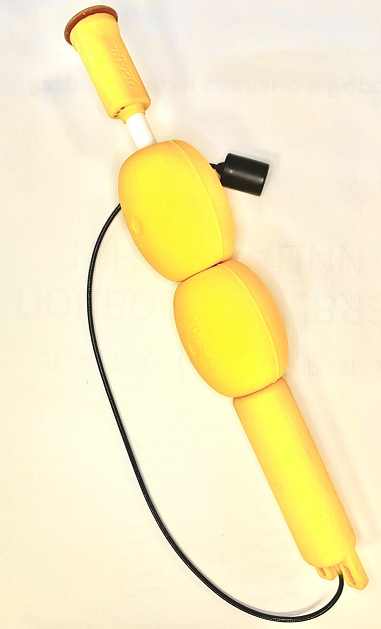 |
| Figure 1 - GNSS-equipped sonobuoy RedBase |
The buoys are placed on the water surface in the operating area and held in position by anchors.
Keep in mind that although the buoys have a small positive buoyancy, they are not designed to be attached directly to the anchor line. To relieve the buoy of the weight of the anchor line, fenders (or floats) matched to the weight of the line must be used.
Figure 21 shows the recommended layout for installing the buoy on a body of water.
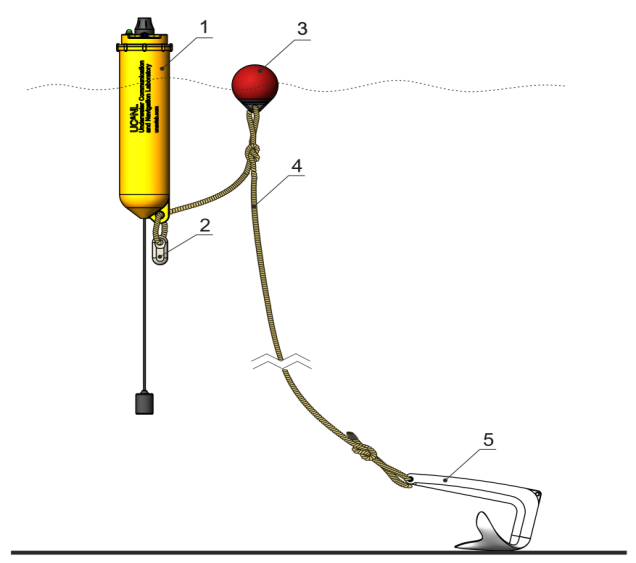 |
| Figure 2 - Recommended installation layout of the RedBase buoy |
| 1 - GNSS-equipped sonobuoy RedBase, 2 - additional weight2, 3 - float, 4 - anchor line, 5 - anchor |
1 The images may differ slightly from the supplied products,
as the manufacturer is constantly working to improve the characteristics and is making changes to the design.
2 The additional weight is used only in the underloaded version.
2.1.2. Operating modes and light indication
The indicator light sources are located in the upper part of the surface block of the buoy, which is made of a translucent polymer. The buoys in each set have different addresses from 1 to 4. When a buoy is switched on, it reports its number in the set by means of the indicator: the number of flashes corresponds to the number of the buoy.
After reporting its number, the buoy enters the operating mode.
- If the buoy battery is charged, the indicator lights continuously until the built-in GPS/GLONASS receiver detects the signals of the satellites of the global satellite navigation system. After that it flashes at a rate of 1 flash every 4 seconds. The number of flashes in this case also corresponds to the number of the buoy in the set.
- If the buoy battery is in a state where less than 20% of the charge remains, the indicator flashes at a rate of 1 flash per second. The number of flashes in this case also corresponds to the number of the buoy in the set.
If the user notices flashes at a rate of 1 flash per second, the buoy should be switched off and put on charge as soon as possible. Prolonged operation with a discharged power source is not allowed.
If the battery is in a state of critical discharge, the buoy switches off automatically after reporting its number; in this case the indicator is also switched off. The buoy must be put on charge immediately to avoid failure of the built-in power source.
2.1.3. Preparation for use and checks
Before installing the buoy, make sure that:
- the cable of the underwater acoustic transmitter is intact;
- there are no traces of corrosion on the contacts of the water detector (underwater block, see Fig. 3);
- there are no traces of corrosion on the charging contacts and the service cable connection contacts (surface block, see Fig. 4);
- the device has no mechanical damage;
- the light indication works and the built-in power source of the buoy is not discharged (see 2.1.2).
The buoy switches on automatically when its lower part, which contains the water detector contacts (see Fig. 3), is placed in the water, and switches off automatically when the buoy is taken out of the water.
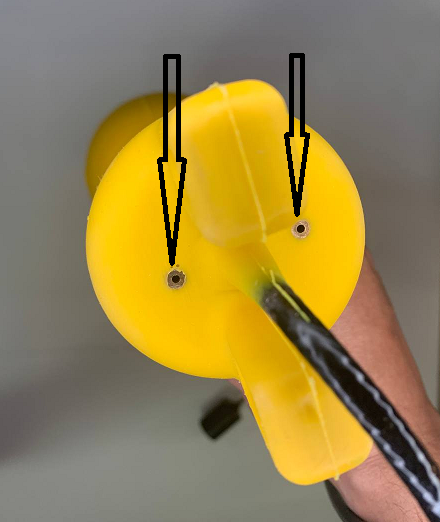 |
| Figure 3 - Water detector contacts on the lower part of the underwater block of the device |
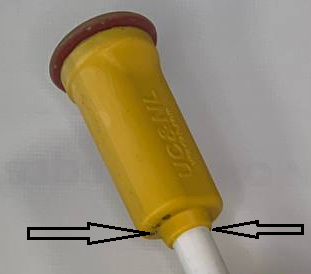 |
| Figure 4 - Charging contacts and service cable connection contacts |
2.1.4. Storage and maintenance
The buoys have no special storage and maintenance requirements, except for the following:
- When used in salt and/or heavily polluted water, desalination (soaking and rinsing in fresh water) is necessary;
- The use of any organic solvents, strong acids, alkalis and other aggressive substances is not allowed;
- If necessary, the buoys may be washed in household soap solutions;
- Exposure of the elements of the device to shock or significant static loads is not allowed;
- During long-term storage (more than 1 month), the devices must be recharged to prevent degradation of the built-in lead-acid battery;
- The use of third-party chargers is not allowed;
- Storage in the switched-on state is not allowed;
- Strong bending (to a radius of less than 5 cm) of the cable of the underwater acoustic transmitter is not allowed;
- After use, the water detector contacts (underwater block, see Fig. 3) and the charging and service cable connection contacts (surface block) must be rinsed and dried to avoid their corrosion. Silicone grease may be used to protect the contacts from corrosion.
2.1.5. Charging the built-in power supply
The device is charged using the supplied accessory (see Fig. 5), and only when the device is switched off and completely dry.
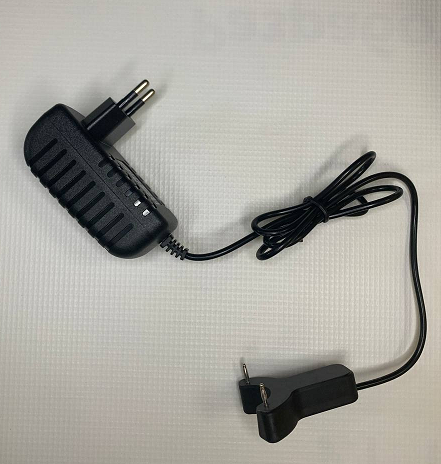 |
| Figure 5 - Charger for the RedBase buoys |
Before connecting the accessory to the buoy, disconnect it from the mains. Make sure that the charging contacts of the accessory are seated in the sockets on the buoy, and then connect the charger to the mains. Depending on the version of the charger, the indication of the operating modes may differ. For more complete information, refer to the instructions for the charger.
Figures 6 and 7 illustrate how the charging accessory is connected to the buoy.
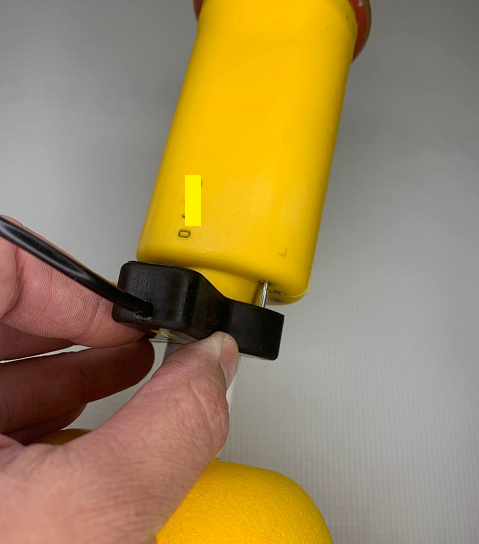 |
| Figure 6 - Charger for the RedBase buoys |
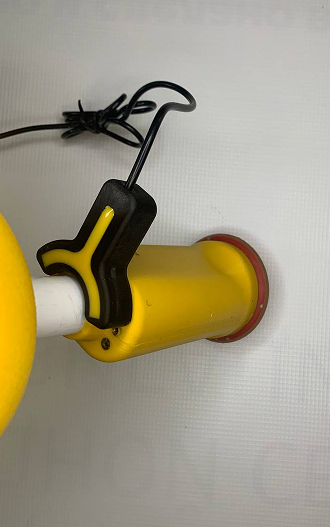 |
| Figure 7 - Charger for the RedBase buoys |
When charging is complete, disconnect the charger from the mains and detach the charging accessory from the buoy.
2.1.6. Connecting the service cable
Connecting the service cable may be required to change the address of the buoy, to determine its serial number or to update the software. The service cable is connected using the supplied adapter, which is plugged into the group of contacts located in the lower part of the surface block of the device. Figure 8 shows how the adapter is connected.
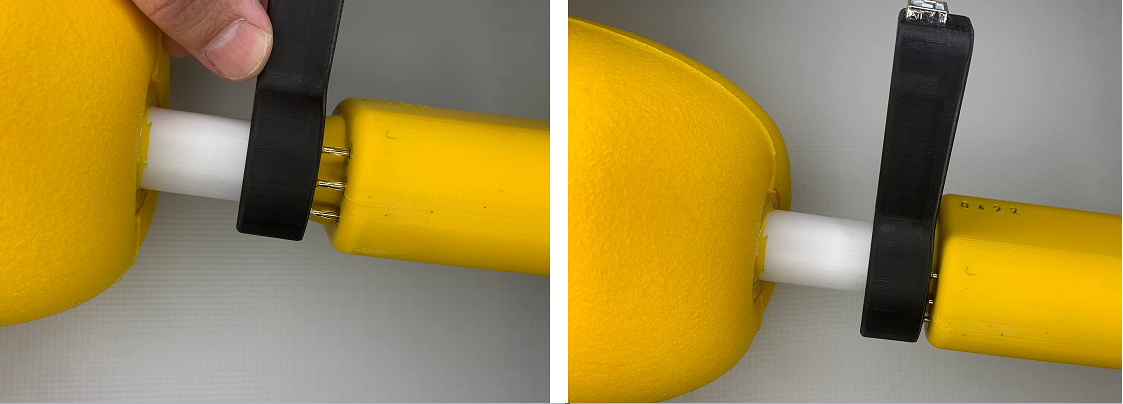 |
| Figure 8 - Connecting the service cable adapter |
After connecting the adapter with the cable to the buoy, connect it to a PC and install the required software on it:
- RedBase_Config to determine the serial number of the device and to set the address
- UCNL_FW_Update to update the software
To switch the buoy on, place its lower part in the water so that the water detector contacts are immersed. After the service operations are completed, switch the buoy off and disconnect the service adapter.
2.1.7. For previous versions of the device
The operating modes and light indication, as well as the requirements for placing the devices on the water, are the same for all versions of the buoys. The specific features of the previous versions of the device, which have hollow housings, are:
- the need to switch the device on and off manually using a toggle switch;
- the presence of connectors with a threaded cover;
Before using devices of these versions, make sure that the rubber cap of the connector is intact and that the connector cover is tightly closed.
Figure 9 shows the location of the controls and indicators on the cover of the buoy.
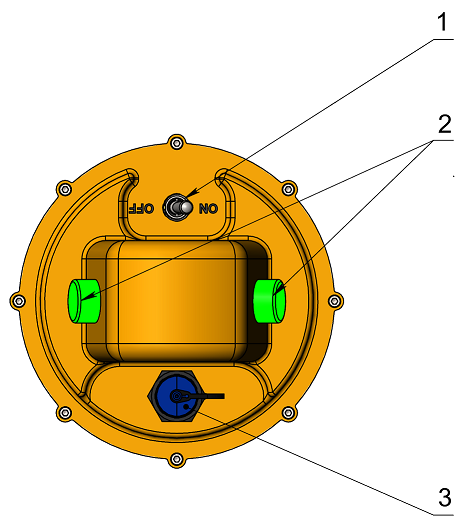 |
| Figure 9 - Location of the controls and indicators on the cover of the RedBase buoy |
| 1 - power toggle switch, 2 - light indication lamps, 3 - charging connector |
CAUTION!
Almost all known cases of buoy failure are due to the user operating a buoy with the cover of the charging connector not screwed on!
Operating buoys with the connector cover not screwed on is prohibited and may result in water entering the device. Failure of buoys due to water entering through an open charging connector is not covered by the warranty!
2.2. RedNode - Integrated navigation receiver
The integrated navigation receiver RedNode provides navigation data to various carriers - ROVs, AUVs, etc. - in the submerged state.
2.2.1. General information
The easiest way to understand the purpose and functionality of the integrated navigation receiver RedNode is by analogy with ordinary GNSS receivers: when connected to a carrier, the receiver receives the underwater acoustic signals of the four RedBase buoys and determines its own geographic position, and the built-in temperature and pressure sensor makes it possible to determine the depth, thereby providing the user with information about the position of the carrier in three-dimensional space. The coordinates are computed in the receiver itself and are available via the serial interface according to the NMEA0183-like protocol. Therefore, if the coordinates computed by the receiver must be transmitted to the ROV control console, this must be done via the information channel of the carrier.
2.2.2. Requirements for integration and placement on the carrier
The receiver must be installed in a position that ensures line of sight to the underwater acoustic transmitters of all four buoys (see section 3). It should be located as far as possible from thruster wash and various noisy mechanisms, sonars, etc., as well as from units and modules that produce strong electromagnetic interference (switching power supplies, electric motors, etc.).
When the device is physically interfaced with the carrier, a reliable and watertight cable entry must be provided that prevents water from seeping in through the free end of the cable. When sealing the free end of the cable, the use of aggressive sealants and compounds (for example, acetic-acid-based silicone sealant, etc.) is not allowed, since their components can cause corrosion of the cable conductors and lead to failure of the device.
The use of epoxy-resin-based compounds for sealing the cable entry is not recommended since, firstly, the latter often degrade and lose their properties under prolonged exposure to moisture and, secondly, they shrink significantly.
Polyurethane-based compounds and sealants are the most reliable and suitable. If you have any questions about the use of specific compounds, it is recommended to consult the manufacturer.
The power requirements are given in the device specification. For information on data exchange with the device and on changing its configuration, refer to the communication protocol specification.
2.3. RedNav - Diver’s navigation receiver
The diver’s navigation receiver RedNav provides navigation data to divers and, accordingly, is needed only when diving operations are performed.
2.3.1. General information
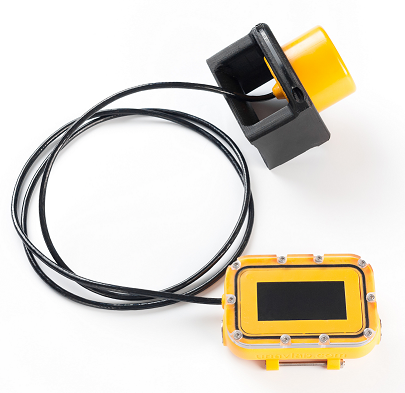
The diver’s navigation receiver RedNav allows a diver to determine their geographic location in the submerged state, without having to surface and without using remote GPS antennas on a cable. Working with the RedNav device is in many respects similar to working with GPS/GLONASS trackers and navigators, the only difference being that the role of the satellites of the positioning system is played by small-sized floating buoys - repeaters of the satellite navigation system signal. To operate an unlimited number of RedNav devices in one operating area, 4 floating relay sonobuoys RedBase are required. The unique functionality and ease of use make RedNav an ideal solution for recreational diving as well as for search, archaeological and underwater engineering work. The general view of the device is shown in Figure 10.
 |
| Figure 10 - Diver’s navigation receiver RedNav |
| General view |
The interface module contains the following main controls and modules:
- a screen for displaying navigation and service information;
- two piezo buttons on the sides, for controlling the device;
- a built-in rechargeable battery;
- a central processor;
Previous versions of the device were additionally equipped with:
- a Bluetooth module;
- a wireless charging receiver.
The acoustic navigation receiver is connected to the interface module by a cable and can be mounted:
- on the diver’s shoulder;
- on a special panel that the diver holds in their hands;
- on the tank, to provide the minimum possible acoustic shadowing.
Optimal operating conditions for the acoustic receiver are achieved when there is line of sight between the navigation receiver and the acoustic transmitters of all four RedBase buoys throughout the entire time of use. This is discussed in more detail in section 3.3.
2.3.2. Working with the device, modes and user interface
2.3.2.1. Navigation mode
To switch the device on, press both buttons of the device simultaneously; they are located on the side surfaces of the interface unit - to the left and to the right of the screen.
CAUTION! The diver’s navigation receiver is equipped with piezo buttons to eliminate the possibility of the device failing due to water entering the housing through the seals of mechanical buttons. Piezo buttons have some operating features, in particular, there is no feedback when they are pressed. The buttons respond only to a sharp change in pressure, therefore all presses used to control the device must be brief.
After switching on, a device that is not placed on the charging pad automatically enters the navigation mode. The appearance of the device screen in the navigation mode immediately after switching on is shown in Figure 11.
CAUTION! Immediately after switching on, the device spends 10 seconds determining the atmospheric pressure for a more accurate determination of the depth. Therefore, it is recommended to switch the device on only in air. If the hydrostatic pressure at switch-on exceeds 1100 mbar, the atmospheric pressure calibration is not performed, and the standard value of 1013.25 mbar is taken as the atmospheric pressure.
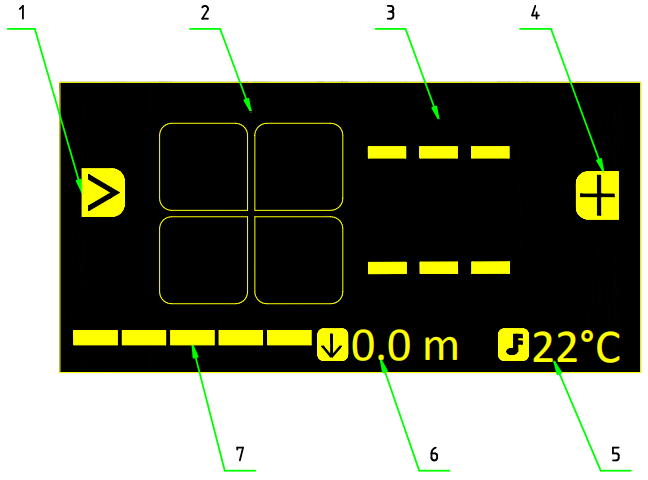 |
| Figure 11 - Main screen of the device in navigation mode |
| Immediately after switching on / no signal received from the buoys |
| 1 - Left button function (switching targets), 2 - buoy statuses, 3 - azimuth and distance to the target, 4 - right button function (mark the current position), 5 - water temperature, 6 - depth (distance to the surface), 7 - charge of the built-in battery |
When the buoy signals are not received (for example, immediately after switching on), the azimuth and distance to the target are not displayed on the screen, because the geographic location of the navigation receiver is either unknown or known to be out of date. The button functions are also unavailable in this case.
Figure 6 illustrates the situation when the navigation receiver has received the signal from the first buoy, but its own location has not yet been determined.
Keep in mind that the buoys transmit their signals in separate time slots, and the receiver receives them sequentially. Accordingly, if the 1st buoy is not received, the 2nd is not received either, and so on.
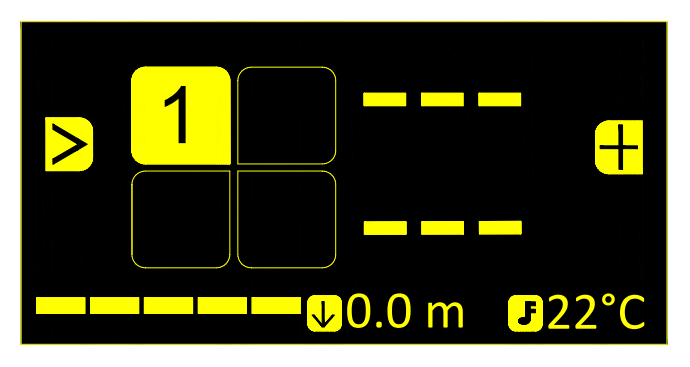 |
| Figure 12 - Main screen of the device during operation |
| The signal from buoy No. 1 is received. The receiver’s own location is not determined |
When the signals from all buoys are received and the coordinates of the navigation receiver are being updated, the main screen looks as in Figure 7. In this example, buoys 2 and 4 have a low charge of the built-in power source, and are therefore displayed as unfilled squares with inverted colors. Buoy No. 1 is selected as the navigation target and its icon is displayed enlarged.
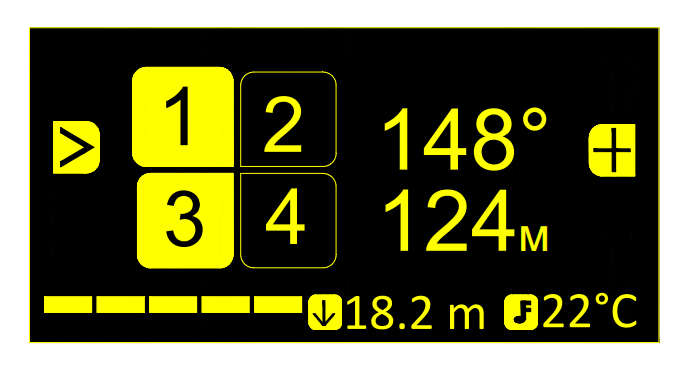 |
| Figure 13 - Main screen of the device during operation |
| The location is determined. Buoy No. 1 is selected as the navigation target |
In field 3 (see Figure 11) Azimuth and distance to the target, the azimuth and the distance to the selected buoy are displayed. Here azimuth means the angular direction measured clockwise from the northern half-meridian to the line to the target.
CAUTION! When the distance to the target is less than 3 meters, dashes ”- - -“ are displayed instead of the angular direction to the target.
When the location is determined (the azimuth and distance to the selected target are displayed), pressing the left button (>) selects the next target in the list (after Buoy No. 1 come Buoys No. 2, 3, 4). If waypoints have been loaded into the device beforehand, they are placed in the target list after the buoys. When the navigation targets are switched, the corresponding navigation information (azimuth and distance) changes as well.
Pressing the right button (+) saves the current location separately (a marked point is saved), and it is placed at the end of the target list. An information message is displayed in this case, as in Figure 14.
 |
| Figure 14 - Message confirming that the current location has been saved |
The loaded points and waypoints are numbered, and when they are selected as targets using the > button, they are displayed as in Figure 15.
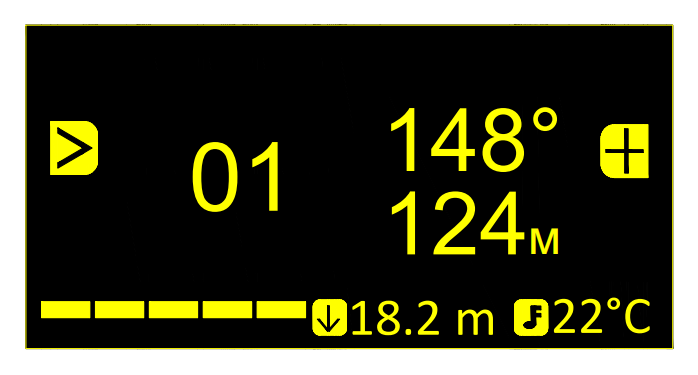 |
| Figure 15 - Main screen of the device during operation |
| The 1st waypoint/saved point is selected as the navigation target |
To switch the device off, press both buttons simultaneously. The device will then ask for confirmation of the switch-off, as shown in Figure 16.
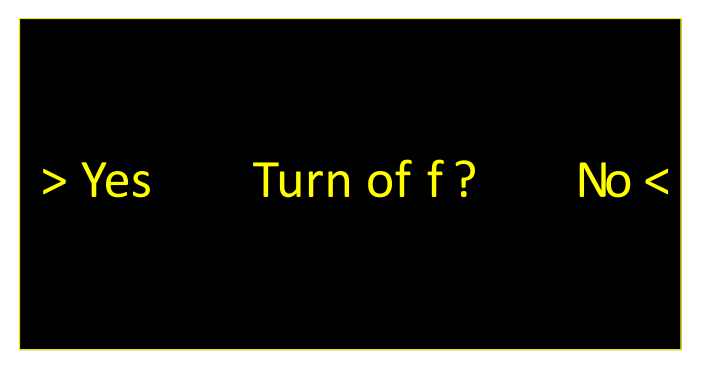 |
| Figure 16 - Request to switch off the device |
2.3.2.2. Service mode
CAUTION!!! In previous versions, the device had wireless charging and was paired with a PC via Bluetooth. Working with devices equipped with watertight connectors is practically the same, except that, instead of placing the device on the charging pad, the user must connect it to a PC using the supplied USB dongle. In this case the interface does not contain the Bluetooth icon.
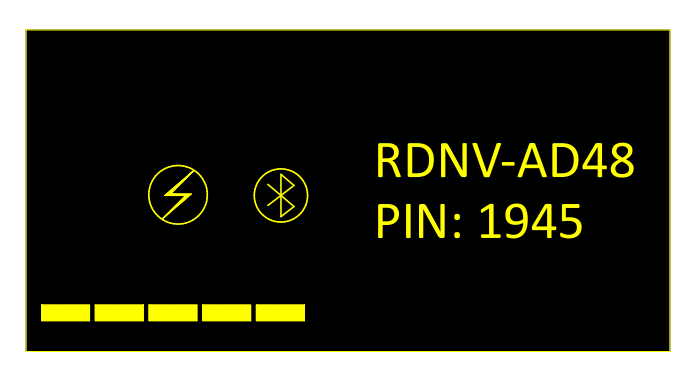
When the interface unit is placed on the charging pad, the device enters the service mode. In this mode the built-in power source is charged and the device configuration can be set. Figures 17 and 18 show the device screen after it is placed on the charging pad. The charging and wireless connection states are indicated by the brightness of the corresponding icons.
Keep in mind that the charging pad must be in direct contact with the housing of the interface unit. If a strap is attached to the interface unit, pull it away and place the charging pad between the housing of the interface unit and the strap. Otherwise, the distance between the transmitter of the charger and the receiver inside the housing of the interface unit will be insufficient to provide the required charging current.
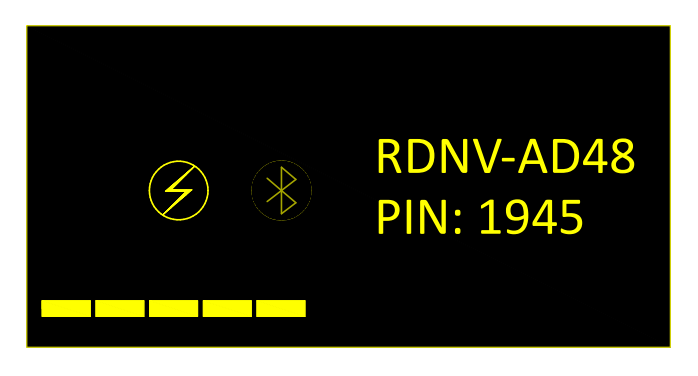 |
| Figure 17 - Screen of the device in service mode |
| The charging icon is bright - charging is in progress, the Bluetooth icon is dimmed - no connection is established |
 |
| Figure 18 - Screen of the device in service mode |
| Both icons are bright - charging is in progress, the Bluetooth connection is established |
When the device is on the charging pad, after 5 minutes of inactivity the screen is switched off in order to save energy and to charge the built-in power source faster. Pressing any button on the interface device switches the screen back on.
When the interface unit is removed from the charging pad, the device switches off automatically.
2.3.2.3. Built-in Bluetooth module and synchronization
The diver’s navigation receiver contains a Bluetooth module used for:
- configuring the device from a PC;
- transmitting coordinates to an external system in real time (emulation of a Bluetooth GNSS receiver).
The module is switched on when the device starts, regardless of the mode the device is in, and is switched off after 10 minutes to save power if no connection to it has been made during this time.
The module of each navigation receiver has a unique Bluetooth device name in the format:
RDNV-XXXX
where XXXX is a unique identifier consisting of uppercase Latin letters and digits. An example of how the Bluetooth device name is displayed is shown in Figures 11 and 12 (RDNV-AD48). Below the line with the device name, a hint containing the PIN code is displayed (in this example the PIN code is 1945), which must be entered when the device is first connected to an external system.
If the Bluetooth connection is made while the device is in the navigation mode, the device transmits navigation information, in particular the GGA, RMC and MTW sentences.
Thus, the diver’s navigation receiver RedNav can act as a Bluetooth GNSS receiver, whose data can be used to display the location of the diver in real time on a mapping device, for example on a diver’s tablet that supports connecting an external GNSS receiver via Bluetooth. Keep in mind that radio waves hardly penetrate the water column, and for a stable Bluetooth connection underwater the devices (the interface unit of the diver’s navigation receiver and the mapping device) must be located as close to each other as possible (with their housings touching).
When the device is on the charging pad and in the service mode, the Bluetooth connection is used to change the settings of the diver’s navigation receiver using the specialized software RedNav Host.
Establishing a Bluetooth connection and working with the RedNav Host software is described in the document RedNav Host: User’s manual.
2.3.3. Storage and maintenance
The diver’s navigator RedNav has no special storage and maintenance requirements, except for the following:
- Full discharge of the built-in battery of the navigator is not allowed. During long-term storage (more than 1 month), it is recommended to charge the device periodically;
- After use in salt water, the device must be thoroughly rinsed in fresh water;
- The use of detergents and organic solvents is not allowed. Any dirt is removed with a soft damp cloth. Soap may be used, followed by rinsing in fresh running water;
- Do not leave the device exposed to direct sunlight for long periods;
- The protective glass cover is made of abrasion-resistant polycarbonate, but any contact of the glass cover with hard (sharp) objects should be avoided to prevent scratches and chips on the glass cover;
- Bending of the cable connecting the interface unit to the navigation receiver to a radius of less than 5 cm is not allowed;
- Any shock loads on the housing of the interface unit and on the acoustic receiver should be avoided;
- Contact of the pressure sensor opening of the acoustic receiver with hard (sharp) objects is not allowed; any dirt in the pressure sensor opening must be removed only by rinsing in running fresh water.
3. Effective deployment of a long navigation base
Deploying a long navigation base generally consists of placing four RedBase relay sonobuoys in the area where the work is planned, and switching them on. Each of the four buoys of a set differs from the others by an address that determines the underwater acoustic communication code channel over which the buoy transmits data.
CAUTION! Simultaneous operation of several sets of buoys in one water body, as well as the use of buoys from different sets with the same addresses, is not allowed. In this case the correctness of the coordinate determination and the operability of the system are not guaranteed!
Correct placement of the buoys implies meeting three main conditions:
- ensuring a safe and stable position of the buoys on the water surface;
- ensuring a good view of the celestial hemisphere for the receiving antennas of the satellite navigation systems installed on the buoys;
- ensuring line of sight between the acoustic transmitting transducers of the buoys and all navigation receivers in the submerged position.
These three conditions are considered in more detail below:
3.1. Ensuring a safe and stable position of buoys on the water
To satisfy the first condition, the floating buoys must be installed on anchors that keep the buoys in position against the effects of wind and currents. In this case, the weight of the anchor line must be carried by an additional float, and the buoy must not bear any additional vertical load. Figure 2 shows the recommended layout for anchoring the RedBase buoy.
Use of the system in a sea state of more than 1.5 is not recommended. In a sea state of 2 or more, use of the system is strongly discouraged, and the manufacturer is not responsible for damage to individual devices of the system, their loss, malfunction, etc.
If for any reason one or several buoys need to be moved over a considerable distance (more than 10 m), it is recommended to restart all navigation receivers working in the operating area.
It is important to remember that the buoy is a splash-proof device and is not designed to be submerged! The housing of the buoy and its external controls and indicators are designed to withstand only atmospheric precipitation, occasional waves washing over it, etc. Therefore it is important not to allow the buoy to be submerged!
3.2. Ensuring a view of the celestial hemisphere
The second condition is due to the fact that the RedBase buoys are repeaters of the satellite navigation signal. They have built-in combined GPS/GLONASS receivers, and for the correct operation of the navigation base formed by the buoys, good reception of the satellite navigation signal must be ensured on all buoys. Therefore the buoys should be placed as far as possible from various obstacles that may affect the quality of the received satellite signal, for example metal ship hulls, quay walls, etc.
The RedBase buoys are equipped with light indication. When switched on, the indicator lamps stay lit continuously until the built-in GPS/GLONASS receiver makes the first fix of the geographic location of the buoy. After that they go out and after some time (1–2 minutes on average) the buoy enters the operating mode. In this mode the indicator lamps flash once every four seconds (the number of short flashes corresponds to the number of the buoy). If the built-in battery of the buoy is heavily discharged, the lamps flash every second. In this case the buoy must be put on charge immediately, otherwise this may lead to failure of the built-in battery.
The typical time for a buoy to enter the operating mode (the time before the signal lamp stops lighting continuously) in open water is no more than 2–3 minutes. If the lamp does not go out for a longer time, the location of the buoy should be changed. Repeated occurrence of this situation in an obviously open area, where nothing can obstruct the passage of the satellite navigation signal, is a reason to contact the manufacturer.
3.3. Ensuring line of sight between buoys and navigation receivers
The third condition is determined by the physical principles of operation of the long acoustic navigation base. Since the navigation receivers compute their own position by estimating the arrival times of the acoustic signals from the RedBase buoys to the receivers themselves, their correct operation requires constant line of sight between the acoustic transmitters of all four RedBase buoys and the operating navigation receivers (meaning line of sight through the water column).
The optimal placement of the buoys in the operating area is a convex quadrilateral enclosing the place where the work is performed. The distances between the buoys must not exceed 700 meters and must not be less than 30 meters. Operation of the navigation receivers outside the long base figure is possible but, because of its physical nature, the highest accuracy and reliability of the navigation data can be obtained inside the long base figure.
The worst placement from the point of view of a long navigation base is one in which three or more buoys are arranged in a line.
When placing the buoys and planning their placement, also avoid arrangements in which the water depth (the distance from the water surface to the bottom) at the buoys differs significantly from the water depth at the positioned objects, for example, when the work is to be performed in a narrow stretch of a river with one gently sloping bank. In such cases the buoys should be placed in the deep part of the river.
However, keep in mind that a navigation base figure that is too small (less than 30 meters) and/or strongly elongated (the aspect ratio of the quadrilateral is more than 4–5) leads to reduced accuracy and/or lower sensitivity in some directions, respectively.
Placing the buoys in ice holes is allowed, provided that the housing of the device is not squeezed by the ice and that the acoustic transducer has sufficient draft (the transmitting transducer of the buoy must be located deeper than the lower edge of the ice by at least 0.5 meters).
Long-term operation of the acoustic transducer in air is not recommended. Also make sure that the acoustic transducer hangs freely in the working position, without touching the anchor line or any other objects.
4. Troubleshooting
| No. | Symptoms | Possible cause | Remedy |
|---|---|---|---|
| 1 | When the device is placed on the charging pad, the service mode does not turn on, although the power indicator is lit (power is supplied to the charging pad) | 1. The charging pad is not in close contact 2. The charging pad is faulty |
1. Find the optimal position of the charging pad 2. Replace the charging pad |
| 2 | In the navigation mode the location is not determined, although all buoys are received | The system cannot determine the location with sufficient accuracy due to an unfavorable mutual arrangement of the buoys and the navigation receiver or unfavorable hydrological conditions | 1. Make sure that the buoys form a convex quadrilateral and start navigating inside the figure of the buoys, keeping away from the buoys |
| 3 | In the navigation mode the location is not determined because the reception of the buoys is unstable | 1. One of the buoys is not working 2. Hydrological conditions prevent stable reception of the buoy signals 3. There is no line of sight between the buoy transmitters and the navigation receiver |
1. Check that all buoys are working 2 and 3. Try to start navigating from a different place, making sure that nothing obstructs the passage of the signal (elements of the underwater landscape and port infrastructure, dense algae growth, etc.) |
| 4 | The scatter of the points along the track is too large and exceeds 2–3 meters | Possible causes include too fast movement of the navigation receiver or the buoys and/or a strong current. Although the system is able to compensate for the Doppler shift, this function only ensures the stability of the communication, and the quality of the navigation data may degrade. | Ensure a stable position of the buoys, preventing their drift. Try to reduce the speed of movement of the positioned object. If the likely cause is a strong current associated with tidal processes, try to work during slack water. |
5. Obligations and disclaimer
5.1 Terms of replacement and free warranty service
The manufacturer’s warranty covers only factory defects that become apparent during operation of the device in accordance with this manual during the warranty period (2 years from the date of purchase).
The manufacturer guarantees free repair or replacement of faulty equipment from the delivery set that has failed due to a factory defect.
Grounds for refusing free warranty service, free repair and replacement include:
- any mechanical damage to the equipment from the delivery set, including damage to the insulation of wires and cables;
- any damage caused by exposure to moisture and contamination as a result of improper operation of the equipment from the delivery set;
- any electrical damage caused by the use of accessories not included in the delivery set; accessories supplied by the manufacturer or its representative to replace faulty or lost ones are not considered to be outside the delivery set;
- any signs of unauthorized repair and/or opening of the equipment from the delivery set.
5.2 Limitation of the manufacturer’s liability
ANY OF THE PARTS OF THE DELIVERY SET, INDIVIDUALLY AND AS PART OF THE SYSTEM, HEREINAFTER REFERRED TO AS THE “SUPPLIED EQUIPMENT”:
- WAS NOT DESIGNED AS RESCUE EQUIPMENT
- WAS NOT TESTED AS RESCUE EQUIPMENT
- IS NOT RESCUE EQUIPMENT
- THE MANUFACTURER DECLARES THAT THE SUPPLIED EQUIPMENT IS SAFE WHEN OPERATED IN ACCORDANCE WITH THESE INSTRUCTIONS, AND THE MANUFACTURER IS NOT RESPONSIBLE FOR ANY CONSEQUENCES OF THE USE OF THE SUPPLIED EQUIPMENT