docs.unavlab.com
Main ❯ Educational projects ❯ WAYU: User’s manual
ℹ This document can be printed directly from the browser. For best results:
- select a range of pages to print, excluding the first and last
- in the advanced settings, disable headers and footers
 |
|
|---|---|
| www.unavlab.com support@unavlab.com |
WAYU - Underwater acoustic tracking system User’s manual |
WAYU
User’s manual
Contents
- 1. Introduction
- 2. Working with the system
- 3. Obligations and disclaimer
1. Introduction
1.1. Purpose
The WAYU underwater acoustic tracking system is designed for:
- determining the geographic location of an underwater object (AUV, ROV, HOV, diver, etc.) equipped with a WAYU Pinger pinger beacon.
1.2. Features
The WAYU system is the simplest to use and most affordable, yet sufficiently accurate, solution for tracking an underwater object. The system does not require any calibration or integration: you only need to place a WAYU Pinger pinger beacon on the underwater object (ROV, AUV, diver, etc.) and four WAYU GIB navigation buoys on the water surface. This configuration makes it possible to track the movement of the underwater object in real time.
1.3. System composition
The minimum system configuration includes:
- Four sonobuoys WAYU GIB:
| WAYU GIB Receiving navigation sonobuoy |
- Navigation solver/radio modem/dongle with a built-in GNSS receiver uNav WAYU RF Dongle, for receiving navigation information from the buoys:
| WAYU RF Dongle Digital radio receiver |
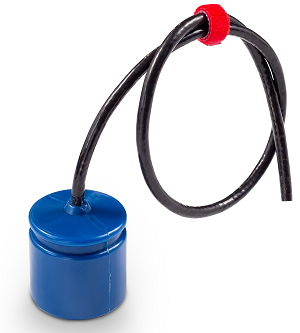
- WAYU Pinger pinger beacon. The pinger operates independently, and the geographic position of the object carrying the pinger is updated every two seconds.
 |
|---|
| WAYU Pinger Pinger beacon |
2. Working with the system
2.0. Before operation
To track an underwater object equipped with a standalone WAYU Pinger pinger, the uNav application must be installed on the operator’s PC. Before starting work, be sure to read the short user’s manual: uNav application: User’s manual
Download the required software in advance. Installation is not required - just unpack the contents of the archive to any convenient location.
Before going out on the water, make sure that all equipment is fully charged and, if necessary, charge all devices.
Since the devices have built-in power supplies based on LiFePO4, they have a very flat discharge characteristic, and it is difficult to determine the charge level of the built-in power supply. Therefore, it is recommended to charge all devices no earlier than 1–2 days before use.
2.1. Preparation for operation and equipment check
2.1.2. Checking the buoy set
- Make sure that all buoys of the set are intact, paying special attention to the transducer cable;
- Make sure that all buoys are operational and that their built-in power supplies are sufficiently charged. To do so, turn the buoys on by placing the bottom part of each buoy in the water: if a GNSS signal is available, each buoy transmits a status message over the radio channel, even when no pinger signal is being received; the message contains the buoy’s address, the voltage of its built-in power supply and its geographic location.
The buoys in each set have different addresses from 1 to 4; the buoy number is marked on the float.
If the battery is critically discharged (voltage below 11.9 V), the buoy must be put on charge immediately to prevent failure of the built-in power supply.
If everything is done correctly and the upper parts of the buoys have a good view of the sky, after some time (usually no more than 1–2 minutes) you will be able to see the positions of the buoys in the main application window.
After that, you can place the buoys on the water surface.
2.1.2.1. Charging the built-in power supply
The device is charged using the supplied accessory, and only when the device is switched off and completely dry.
| Buoy charger |
There are two bronze contacts at the bottom of the buoy; they serve both to switch the device on when it enters the water and to charge its built-in power supply. Each contact is marked with the symbol “+” or “-“, denoting the positive and the negative terminal of the power supply, respectively. Observe the polarity when connecting the charger. The positive terminal on the charger is marked in red.
Before connecting the accessory to the buoy, disconnect the accessory from the mains. Make sure that the charging contacts of the accessory are seated in the sockets on the buoy with the correct polarity, then connect the charger to the mains.
Depending on the version of the charger, the operating mode indication may differ. For more complete information, refer to the charger’s instructions.
As a rule, chargers have the following indication:
| Mode/state | Indicator |
|---|---|
| Charger is connected to the mains | Lit red |
| Battery is connected, charging in progress | Off |
| Charging complete | Lit red |
| Connecting the charger to the buoy |
When charging is complete, disconnect the charger from the mains and disconnect the charging accessory from the buoy.
2.1.3. Positioning the buoys on the water surface
The buoys are placed on the water surface in the operating area and held in position by anchors.
Keep in mind that although the buoys have a small positive buoyancy, they are not designed to be attached directly to the anchor line. To relieve the buoy of the weight of the anchor line, fenders (or floats) matched to the weight of the line must be used.
The figure below1 shows the recommended layout for installing a buoy on a body of water.
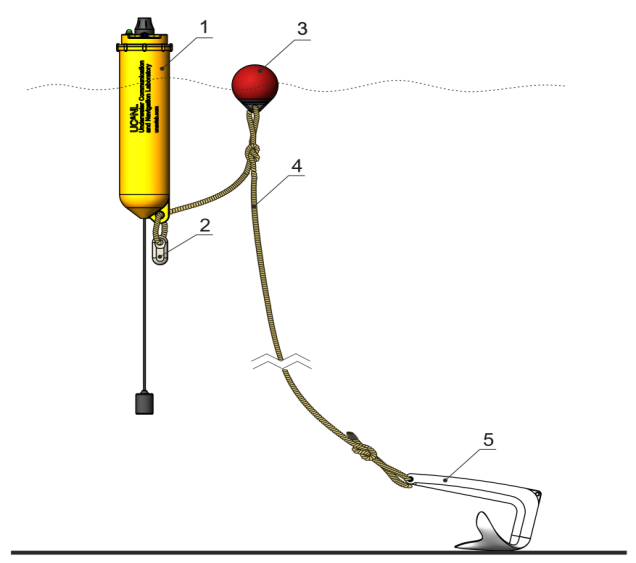 |
| Recommended buoy installation layout |
| 1 - navigation sonobuoy, 2 - additional weight2, 3 - float, 4 - anchor line, 5 - anchor |
1 Images may differ from the supplied products,
as the manufacturer is constantly working to improve the characteristics and is making changes to the design.
2 Additional weight is used only in the underloaded version.
The buoys should be positioned in a convex quadrilateral that covers the entire intended work area with a small margin. For the system to operate effectively, it is important to observe several simple conditions:
- the buoys are located no closer than 30 m and no farther than 300 m from each buoy to each of the others
- there must be a direct line of sight from each buoy to the receiving radio modem of the operator console
- there must be a direct line of sight from the underwater acoustic receiver of each buoy to the underwater object being positioned
- it is not recommended to place the buoys close to the shore, port infrastructure facilities or vessels
- the size of the navigation base (the average size of the rectangle formed by the buoys on the water surface) must not be less than the maximum depth of the object being positioned
- the size of the navigation base must be slightly larger than the intended work area
CAUTION!
The buoys are not underwater devices and are designed to operate on the water surface. Although the protection class implies that the device may be briefly covered by a wave, keep in mind that the built-in radio equipment (the GNSS module and the radio modem) cannot operate in such conditions!
It is not recommended to throw the buoys overboard. Lower them carefully onto the water surface, making sure at the same time that the length of the anchor line is sufficient, that its weight is carried by the relief fender, and that the buoy floats vertically on the water surface and is not subjected to any additional loads.
2.1.4. Preparing the underwater equipment
No preliminary actions are required, except for pre-charging the built-in power supply (battery pack) for the version with a standalone pinger beacon. If the pinger beacon and the battery pack are joined by a detachable connection, first make sure that the watertight connector is firmly closed and serviced (for threaded connectors, make sure that the O-rings are lubricated with silicone grease; for SUBCONN-type and similar connectors, make sure that the lubricant recommended by the connector manufacturer is applied to both halves of the connector).
In the standalone version, the pinger beacon switches on automatically when it enters the water (the water-activation contacts are located on the connector).
The pinger beacon must be fastened only by its mounting groove, using a soft clamp, so as to avoid any uneven loading of the beacon housing, excessive compression, and shading/shielding of the beacon housing. The figure below shows the basic requirements for mounting the acoustic part of the pinger beacon on the carrier:
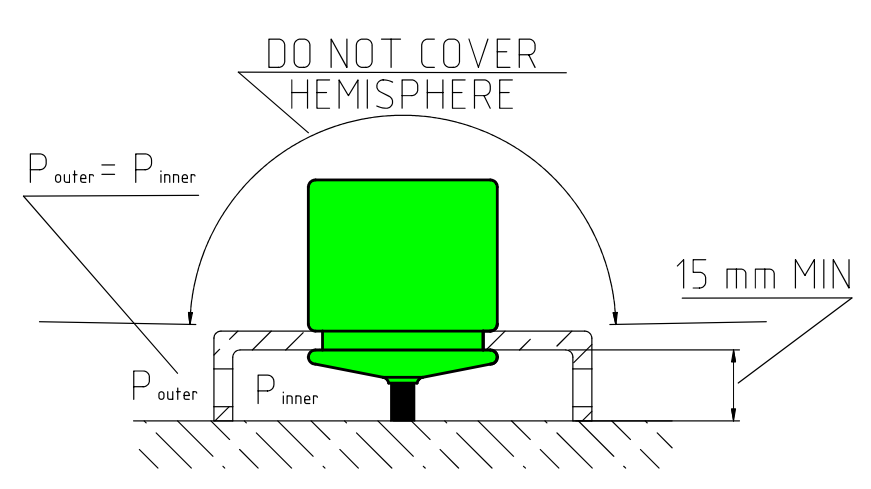 |
| Requirements for mounting the acoustic part of the pinger beacon on the carrier |
| Shielding of the spatial hemisphere or of the parts of the transducer located above the mounting groove is not allowed; the pressure in the area under the mount must be balanced with the external pressure |
It is easy to check that the pinger beacon is working: when switched on, it begins to emit a navigation signal (audible as a click) with a period of 2 seconds.
2.1.5. Preparing the radio dongle for operation
Connect the radio dongle to the PC on which the uNav application is installed, using a USB-B cable.
After power is applied, the radio modem’s indicator turns on (blinks). The radio modem has a two-color indicator. One of the colors lights up synchronously with the arrival of messages from the buoys over the radio channel, thereby signaling that communication with the buoys is established, while the other lights up when the next batch of data is received from the built-in GNSS receiver, and goes out if the data is valid. If it stays lit continuously, this indicates that the built-in GNSS module has not yet determined its own location.
During normal operation of the system, one of the indicators will blink 1 time per second, and the other should blink four times within 2 seconds - this is the period within which the transmissions from all four buoys should arrive.
2.1.6. Selecting a location for the operator console
Mount the radio modem at the highest possible point, so that throughout the entire operation of the system there is a direct line of sight between the radio modem antenna and all the buoys.
The radio modem antenna must not be obstructed by any objects that block the radio signal: elements of the vessel’s deck superstructure, the vessel’s side, the mast and other radio equipment, trees, building walls, elements of port infrastructure, etc.
2.2. Working with the system
Keep in mind the factors that reduce the efficiency of the system:
- hydrological conditions: natural and man-made noise can degrade or completely preclude normal operation of the system; unfavorable underwater terrain and bottom vegetation can contribute to acoustic shadowing, etc.
- the positioned object(s) moving outside the navigation base (the figure formed by the buoys on the water surface): the most stable operation of the system is achieved inside the navigation base. A position in the immediate vicinity of one of the buoys, or directly behind it, is also unfavorable.
- large vessels, especially those with a deep draft, can obstruct the passage of the acoustic signal.
The location of an underwater object can be determined when GNSS reception is available on all buoys and the operator console receives radio signals from all buoys, i.e. when the positions of all four buoys are displayed in the application.
2.3. After operation
The navigation buoys must be:
- removed from the anchors;
- cleaned of contamination (silt, dirt, algae, etc.);
- desalinated, if the work was not carried out in fresh water;
- wiped free of moisture with a soft cloth before being placed in the transport case;
The following is not allowed:
- Storage without rinsing in fresh water;
- Storage of the buoys together with wet anchor lines and other wet objects;
The pinger beacon must be:
- removed from the carrier;
- washed clean of contamination (silt, dirt, algae, etc.);
- desalinated, if the work was not carried out in fresh water;
- carefully wiped with a soft cloth and dried in air for at least 30 minutes;
The following is not allowed:
- Storage while damp (especially with seawater);
3. Obligations and disclaimer
3.1. Terms of replacement and free warranty service
The manufacturer’s warranty applies only to factory defects that become apparent during operation of the device in accordance with this manual during the warranty period (2 years from the date of purchase).
The manufacturer guarantees free repair or replacement of faulty equipment from the delivery set that has failed due to a factory defect.
The grounds for refusing free warranty service, free repair and replacement include:
- any mechanical damage to the equipment from the delivery set, including damage to the insulation of wires and cables;
- any damage caused by exposure to moisture and contamination as a result of improper operation of the equipment from the delivery set;
- any electrical damage caused by the use of accessories not included in the delivery set (the charger), or by the use of poor-quality and/or failed batteries; accessories supplied by the manufacturer or its representative to replace faulty or lost ones are not considered to be outside the delivery set;
- any signs of unauthorized repair and/or opening of the equipment from the delivery set.
3.2. Limitation of the manufacturer’s liability
ANY OF THE PARTS OF THE DELIVERY SET, INDIVIDUALLY AND AS PART OF THE SYSTEM, HEREINAFTER REFERRED TO AS THE “SUPPLIED EQUIPMENT”:
- WAS NOT DESIGNED AS RESCUE EQUIPMENT
- WAS NOT TESTED AS RESCUE EQUIPMENT
- IS NOT RESCUE EQUIPMENT
- THE MANUFACTURER DECLARES THAT THE SUPPLIED EQUIPMENT IS SAFE WHEN OPERATED IN ACCORDANCE WITH THESE INSTRUCTIONS, AND THE MANUFACTURER IS NOT RESPONSIBLE FOR ANY CONSEQUENCES OF THE USE OF THE SUPPLIED EQUIPMENT
THE MANUFACTURER GUARANTEES THAT THE RWLT UNDERWATER ACOUSTIC TRACKING SYSTEM (HEREINAFTER - THE SYSTEM):
- IS INTENDED ONLY FOR USE WITH PINGER BEACONS OR DIVER COMMUNICATION STATIONS DESIGNED TO OPERATE TOGETHER WITH THE SYSTEM
- BY DESIGN CANNOT BE USED FOR TRACKING OBJECTS THAT ARE NOT EQUIPPED WITH PINGER BEACONS OR DIVER COMMUNICATION STATIONS NOT DESIGNED TO OPERATE TOGETHER WITH THE SYSTEM
- CONTAINS ONLY CIVILIAN RADIO FREQUENCY MODULES THAT ARE NOT SUBJECT TO LICENSING: GNSS RECEIVERS AND RADIO MODEMS
THE ABOVE LIMITATIONS CANNOT BE LIFTED BY ANY MANIPULATION OF THE SETTINGS AND/OR CONTROLS OF THE SYSTEM DEVICES AND/OR OF THE SOFTWARE INTENDED FOR USE WITH THE SYSTEM