docs.unavlab.com
Main ❯ Accessories ❯ Crimea-300 OS interface module
 |
 |
|---|---|
| Electronic version of the document |  |
| www.unavlab.com support@unavlab.com |
Crimea-300 OS Interface module Device specification |
FEATURES
- Display of absolute pressure, depth, water temperature and speed of sound
- LCD screen clearly readable in bright light
- RS-485 interfacing
- Atmospheric pressure and water density calibration functions
DESCRIPTION
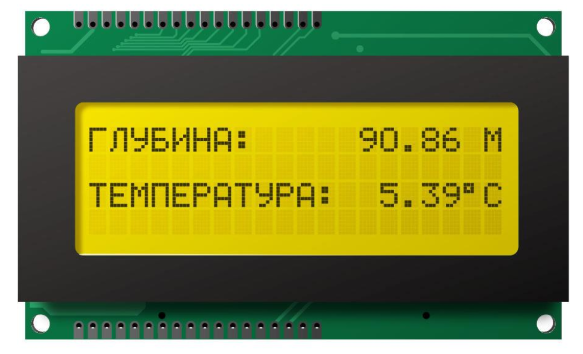
The interface module is designed to display the information received from the Crimea-300 absolute pressure sensor. The module displays:
- depth (the distance from the water surface to the sensor, calculated from the measured pressure and temperature and the specified water density)
- water temperature;
- absolute pressure;
- speed of sound value (calculated from the measured pressure and temperature);
The module has a built-in function for calibrating the atmospheric pressure and for setting the water salinity for more accurate depth determination.
TECHNICAL SPECIFICATIONS
| PARAMETER | VALUE |
|---|---|
| DIMENSIONS (L x W x H) | 98 x 60 x 21 mm |
| MAXIMUM POWER CONSUMPTION | 1.1 W |
| SUPPLY VOLTAGE | 4 .. 12 V |
| INTERFACE | RS-485 |
| DATA LINE VOLTAGE (INPUTS A, B) | 0 .. 5 V |
| OPERATING TEMPERATURE RANGE | -20 .. 60 °C |
| MAXIMUM DATA UPDATE RATE | 4 Hz |
| LCD SCREEN | Character-based, 4 lines of 20 characters, Cyrillic |
| CONTROL BUTTONS | 2 pcs, Normally open |
CONNECTION REQUIREMENTS
The interface module is designed to work only with Crimea-300 measuring modules in the version with the RS-485 interface! The measuring module must be connected using a shielded twisted pair with a total length of no more than 600 m.
Figure 1 shows the soldering points for the cable and the control buttons.
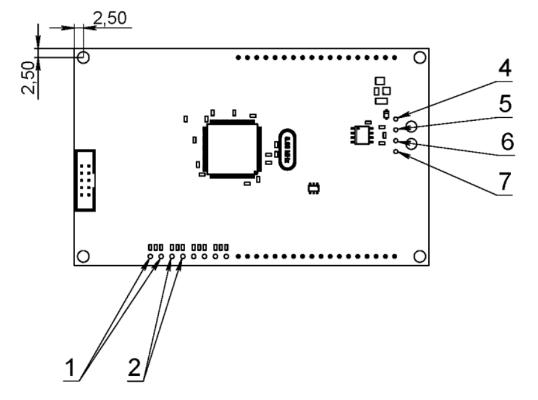 |
| Figure 1 - Location of the soldering points |
Buttons 1 and 2, which are connected to the interface module and used for calibration and control of the module, are NORMALLY OPEN.
Assignment of the soldering points
| Position | What is connected |
|---|---|
| 1 | Button No. 1 wires |
| 2 | Button No. 2 wires |
| 4 | ”+” power supply |
| 5 | B (Tx-/Rx-) |
| 6 | A (Tx+/Rx+) |
| 7 | Common |
SETUP AND OPERATION OF THE SYSTEM
The device is controlled by means of two buttons: two pairs of contacts to which the user must connect normally open, non-latching buttons.
After power is applied to the device, it enters the main operating mode, in which the screen displays the following information, depending on the state of the buttons:
BUTTON FUNCTIONS AND DISPLAY MODES
| Button No. 1 state | Button No. 2 state | What is displayed |
|---|---|---|
| not pressed | not pressed | Depth, temperature |
| pressed | not pressed | Depth, temperature, pressure, pressure at the surface |
| not pressed | pressed | Depth, temperature, speed of sound, salinity |
⚠ Keep in mind that only pressure and temperature are measured directly; the other parameters are calibration or calculated values.
Since the pressure sensor used measures absolute pressure, in some cases it may be necessary to calibrate the atmospheric pressure beforehand; that pressure will subsequently be taken as zero depth. To achieve maximum accuracy, it may be necessary to set the water salinity value.
SETUP
Atmospheric pressure calibration and water salinity setting are available from the device menu. To enter the menu, press both buttons simultaneously. The general appearance of the first-level menu is shown below:
| ——–MENU——– |
|---|
| Z0 CALIBRATION ❮❮❮❮ |
| SALINITY |
| RESET |
⚠ The order of the items and the appearance of the menu may differ slightly depending on the firmware version.
The selected menu item is marked with the string “❮❮❮❮” next to the item name. Switching between menu items is done by pressing button No. 1; activating a menu item is done by pressing button No. 2.
Z0 CALIBRATION
Z0 calibration (atmospheric pressure calibration) is performed to take the atmospheric pressure value into account more accurately. It is recommended to perform this action when the sensor located at the surface (not immersed in water) shows a depth value that differs significantly from zero (tens of centimeters).
To perform Z0 calibration:
- make sure that the sensor is connected to the device, is not immersed in water, and the screen shows the depth and temperature readings
- enter the menu by pressing both buttons simultaneously
- in the menu, select the Z0 CALIBRATION item using button No. 1
- press button No. 2
The device will enter calibration mode for 5 seconds and the message Z0 CALIBRATION… will be displayed on the screen. During this time, do not immerse the sensor in water and do not change the pressure in any way - this may degrade the result and the calibration will have to be repeated.
When the calibration is complete, the device automatically switches to the operating mode.
SETTING THE SALINITY
The density of water depends on its salinity, and hence so does the depth calculated from the measured pressure. An incorrect salinity value can reduce the accuracy of the device readings.
The device allows you to set the water salinity in the range from 0 to 40 in steps of 1 PSU.
For inland freshwater bodies (rivers, lakes, etc.), it is recommended to set the water salinity to 0 PSU. When working in seawater, it is recommended to find out the water salinity for the specific operating area.
You can use the online world ocean salinity database on our website.
To set the water salinity:
- make sure that the sensor is connected to the device and the screen shows the depth and temperature readings
- enter the menu by pressing both buttons simultaneously
- in the menu, select the SALINITY item using button No. 1
- select the appropriate salinity value by cyclic scrolling using button No. 1
- press button No. 2
After that, the message SAVING… will appear on the screen, indicating that the new salinity value is being written to the device’s non-volatile memory. When this is finished, the device automatically switches to the operating mode.
RESETTING THE SETTINGS
To reset the settings to their defaults:
- enter the menu by pressing both buttons simultaneously
- in the menu, select the RESET item using button No. 1
- press button No. 2
After that, the message SETTINGS RESET… will appear on the device screen, indicating that the default water salinity and atmospheric pressure values are being written to the device’s non-volatile memory. When this is finished, the device automatically switches to the operating mode.
Default values:
- water salinity 0 PSU
- atmospheric pressure 1000 mbar
ERROR HANDLING
If a malfunction of the pressure sensor (measuring module) or a break in the data lines occurs, the message “NO COMMUNICATION WITH THE SENSOR” is displayed. The measuring modules have two operating modes: on request and independent. In the first case, the sensor transmits readings only on request, and in the second, periodically, without a request. The interface module has no information about which module is connected to it, so it tries both options. By default, it waits for data from the measuring module. If the data lines are broken, or in a situation where the interface module is already running but the measuring module is not yet, the interface module tries to communicate with the sensor in both ways in turn, changing the mode every 3 seconds. Therefore, when the message “NO COMMUNICATION WITH THE SENSOR” is displayed, the following strings may be displayed at the left of the bottom line:
- ?.. - the interface module sends requests and waits for a response from the sensor
- … - the interface module waits for data from the sensor without sending a request (and without occupying the half-duplex RS-485 line) If the user’s system provides for non-simultaneous power-up of the interface module and the measuring module (with a time difference of more than 1–2 seconds), it is recommended to switch on the sensor at the moment that corresponds to its operating mode.
DIMENSIONAL DRAWING
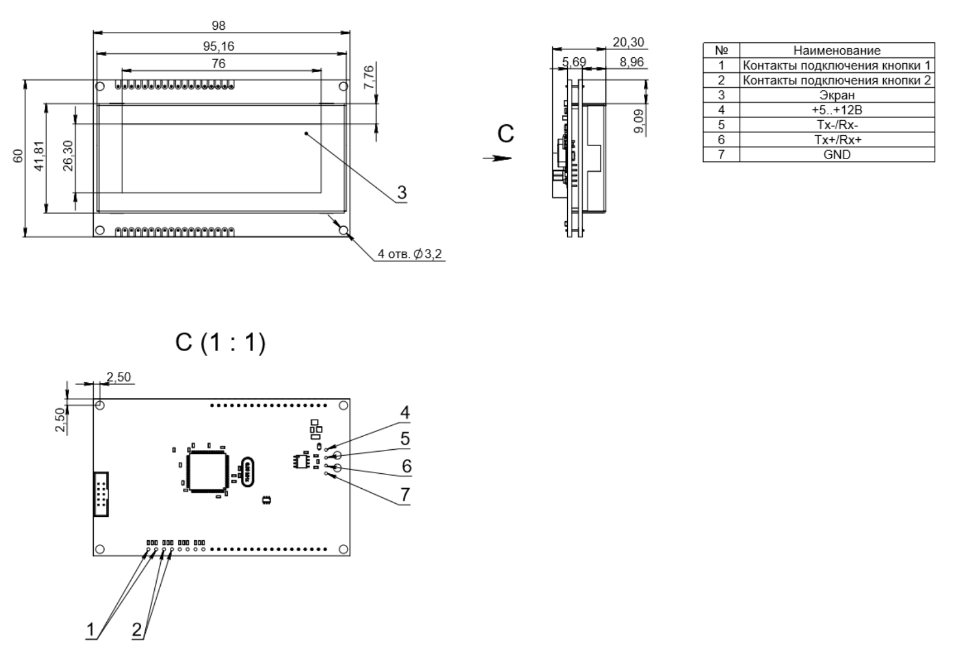 |
| Figure 2 - Dimensional drawing |