docs.unavlab.com
Main ❯ Accessories ❯ Crimea-300 absolute pressure sensor (30 bar, UART/RS-485)
 |
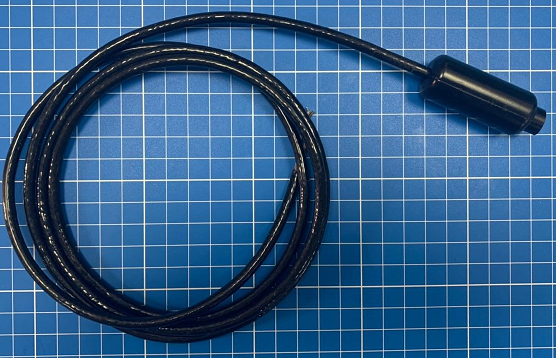 |
|---|---|
| www.unavlab.com support@unavlab.com |
Crimea-300 pressure sensor Device specification |
FEATURES
- Minimum dimensions and weight
- Complete absence of corroding elements
- Monoblock molded polyurethane housing
- Simple NMEA-like protocol
DESCRIPTION
The Crimea-300 absolute pressure and temperature sensor makes it possible to determine ambient parameters and to transmit the data on request or independently. The data is transmitted via a simple NMEA-like ASCII protocol. The sensors are manufactured in two versions: with a UART interface and with an RS-485 interface.
TECHNICAL SPECIFICATIONS
| PARAMETER | VALUE |
|---|---|
| DIMENSIONS (Ø x h) | 21 x 50 mm |
| MAXIMUM OPERATING DEPTH | 300 m |
| CABLE LENGTH2 | 0.5 m |
| CABLE DIAMETER | 5 mm |
| CABLE INSULATION MATERIAL | Polyurethane |
| HOUSING MATERIAL | Polyurethane |
| OPERATING TEMPERATURE RANGE | -10 .. 60 °C |
| MEASURED PRESSURE RANGE | 0 .. 30 bar |
| PRESSURE MEASUREMENT ACCURACY (Range 0 .. 6 bar) | +/- 60 mbar |
| PRESSURE MEASUREMENT ACCURACY (Range 0 .. 20 bar) | +/- 150 mbar |
| PRESSURE MEASUREMENT ACCURACY (Range 0 .. 30 bar) | +/- 350 mbar |
| PRESSURE RESOLUTION | 4 mbar |
| MEASURED TEMPERATURE RANGE | -10 .. 60 °C |
| TEMPERATURE MEASUREMENT ACCURACY (Range 0 .. 10 bar) | +/- 2.5 °C |
| TEMPERATURE RESOLUTION | 0.1 °C |
| SUPPLY VOLTAGE | 5 .. 12 V |
| CURRENT CONSUMPTION | 10 .. 70 mA |
| DATA LINE INPUT VOLTAGE (version with UART interface) | 0 .. 3.3 V |
| DATA LINE OUTPUT VOLTAGE (version with UART interface) | 0 .. 3.3 V |
| HOUSING COLOR3 | Black |
| COMMUNICATION PROTOCOL | NMEA0183-like |
1 Including a cable of standard length.
2 The parameter can be changed by agreement.
3 The default color is indicated. Other colors are available: black, yellow, green, blue. Painting in any color from the RAL catalog is possible when ordering 50 pcs or more.
COMMUNICATION PROTOCOL
1. General information
Crimea-300 sensors are supplied in two versions:
- with a UART electrical interface
- with an RS-485 electrical interface
CAUTION! Due to the specifics of how the RS-485 protocol operates, switching the sensor to the cyclic transmission mode means that it will no longer be possible to change its settings!
1.1. Physical layer protocol
Depending on the version, the device supports data interfacing:
- via the RS-232 physical layer standard for an asynchronous interface (UART) with a data line voltage of 3.3 V
- via the RS-485 physical layer standard
The connection is made using a four-wire cable:
CAUTION! Reverse polarity and/or overvoltage results in irreparable damage to the device that is not covered by the warranty!
Table 1 - Cable wire assignment for the version with the UART 3.3 V interface (Cable variant 1)
| No. | Wire color | Function |
|---|---|---|
| 1 | 🟩 Green | +5 .. + 12 V |
| 2 | ⬛ Black | Tx |
| 3 | ⬜ White/Transparent | Rx |
| 4 | Braid | Common |
Table 2 - Cable wire assignment for the version with the UART 3.3 V interface (Cable variant 2)
| No. | Wire color | Function |
|---|---|---|
| 1 | 🟥 Red | +5 .. + 12 V |
| 2 | 🟩 Green | Tx |
| 3 | ⬜ White/Transparent | Rx |
| 4 | Braid | Common |
Without additional repeaters or interface converters, the maximum length of the data bus for the version with the UART interface for which correct operation of the interface is guaranteed is no more than 2 m.
Table 3 - Cable wire assignment for the version with the RS-485 interface (Cable variant 1)
| No. | Wire color | Function |
|---|---|---|
| 1 | 🟩 Green | +5 .. + 12 V |
| 2 | ⬛ Black | Common |
| 3 | ⬜ White/Transparent | A |
| 4 | 🟫 Brown | B |
Table 4 - Cable wire assignment for the version with the RS-485 interface (Cable variant 2)
| No. | Wire color | Function |
|---|---|---|
| 1 | 🟥 Red | +5 .. + 12 V |
| 2 | 🟩 Green | A |
| 3 | ⬜ White/Transparent | B |
| 4 | Braid | Common |
Connection port settings:
Baudrate: 9600 bit/s
Data bits: 8
Stop bits: 1
Parity: No
Hardware flow control: No
1.2. NMEA0183 dialog layer protocol standard
The NMEA0183 standard describes the format of dialog layer text (ASCII) sentences.
Sentence example: $PTNT1,01,00*hh<CR><LF>
The main elements of an NMEA0183 sentence (message):
- ’$’ - sentence start,
- ‘P’ - Proprietary code
- ‘TNT’ - three-letter manufacturer identifier
- ‘0’ - sentence identifier
- ’,’ - comma (parameter delimiter)
- ‘*’ - checksum delimiter
- ‘hh’ - checksum in hexadecimal format (e.g. FF, 01). Calculated as the bitwise XOR of all bytes between ‘$’ and ‘*’.
- <CR><LF> - end of sentence (line break)
2. TNT command system for Crimea-300 devices
The D2H prefix in a sentence name means that the sentence is sent from the Device to the Host (control system). The H2D prefix in a sentence name means that the sentence is sent from the Host (control system) to the Device.
If a parameter in a command description is defined as ‘xx’, this means a fixed field width of 2 characters. That is, if the required value is 5, it must be padded with a zero on the left: 05, etc.
2.1. IC_D2H_ACK
The IC_D2H_ACK sentence is the device’s response to a request received from the control system.
Sentence format: $PTNT0,x<CR><LF>
| Field/Parameter | Description |
|---|---|
| $ | Sentence start ‘$’ |
| PTNT | TNT |
| 0 | Sentence ID |
| errCode | Error code (see 3.1) |
| <CR><LF> | End of sentence |
2.2. IC_D2H_PRETMP_VAL
The IC_D2H_PRETMP_VAL sentence contains pressure and temperature readings
Sentence format: $PTNTO,x.x,x.x<CR><LF>
| Field/Parameter | Description |
|---|---|
| $ | Sentence start ‘$’ |
| PTNT | TNT |
| O | Sentence ID |
| pressure_mBar | Absolute pressure in mbar, real (floating-point) value |
| temp_C | Temperature in °C, real (floating-point) value |
| <CR><LF> | End of sentence |
2.3. IC_H2D_FLD_SET
The IC_H2D_FLD_SET sentence sets the value of a configuration field. If the new value is set successfully, the device sends the IC_D2H_FLD_VAL sentence; otherwise it sends an error code using the IC_D2H_ACK sentence.
Sentence format: $PTNT2,xx,xx<CR><LF>
| Field/Parameter | Description |
|---|---|
| $ | Sentence start ‘$’ |
| PTNT | TNT |
| 2 | Sentence ID |
| fldID | Field ID (see 3.2.) |
| fldNewValue | New field value (see 3.2.) |
| <CR><LF> | End of sentence |
2.4. IC_D2H_FLD_VAL
The IC_D2H_FLD_VAL sentence contains the value of a configuration field.
Sentence format: $PTNT3,xx,xx<CR><LF>
| Field/Parameter | Description |
|---|---|
| $ | Sentence start ‘$’ |
| PTNT | TNT |
| 3 | Sentence ID |
| fldID | Field ID (see 3.2.) |
| fldNewValue | New field value (see 3.2.) |
| <CR><LF> | End of sentence |
2.5. IC_H2D_ACT_INVOKE
Request to perform a service action.
Sentence format: $PTNT6,xx,00<CR><LF>
| Field/Parameter | Description |
|---|---|
| $ | Sentence start ‘$’ |
| PTNT | TNT |
| 6 | Sentence ID |
| actID | Action ID (see 3.3.) |
| reserved | ‘00’ - reserved |
| <CR><LF> | End of sentence |
2.6. IC_H2D_LOC_DATA_GET
Request for the value of a local parameter. Depending on the data ID, the device responds with the IC_D2H_LOC_DATA_VAL sentence or with the IC_D2H_PRETMP_VAL sentence if the data ID corresponds to DATA_ID_PRETMP.
Sentence format: $PTNT4,xx,00<CR><LF>
| Field/Parameter | Description |
|---|---|
| $ | Sentence start ‘$’ |
| PTNT | TNT |
| 4 | Sentence ID |
| dataID | Parameter ID (see 3.4.) |
| reserved | ‘00’ - reserved |
| <CR><LF> | End of sentence |
2.7. IC_H2D_LOC_DATA_VAL
Local parameter value.
Sentence format: $PTNT5,xx,x.x<CR><LF>
| Field/Parameter | Description |
|---|---|
| $ | Sentence start ‘$’ |
| PTNT | TNT |
| 5 | Sentence ID |
| 4 | Sentence ID |
| dataID | Parameter ID (see 3.4.) |
| dataValue | Parameter value |
| <CR><LF> | End of sentence |
3. Identifier tables
3.1. Error codes
| No. | Error code | Description |
|---|---|---|
| 1 | 0 | No error |
| 2 | 1 | Syntax error |
| 3 | 2 | Parameter is outside the range of valid values |
| 4 | 3 | Sensor error |
| 5 | 4 | Request not supported |
3.2. Configuration fields
| No. | Field ID | Name | Value range | Description |
|---|---|---|---|---|
| 1 | 0 | CFLD_DATA_CHANNEL_BAUDRATE | 0 - 1200 b/s 1 - 2400 b/s 2 - 4800 b/s 3 - 9600 b/s 4 - 19200 b/s 5 - 38400 b/s 6 - 57600 b/s 7 - 115200 b/s |
Port baud rate |
| 2 | 1 | CFLD_DATA_CHANNEL_PARITY | 0 - None 1 - Even 2 - Odd |
Parity check |
| 3 | 2 | CFLD_DATA_CHANNEL_MODE | 0 - operation on request 1 - cyclic transmission (without request) |
Readings transmission mode |
3.3. Service action identifiers
| No. | Action code | Description |
|---|---|---|
| 1 | 0 | Saving settings to non-volatile memory |
| 2 | 1 | Resetting settings in non-volatile memory |
| 3 | 2 | Device reboot |
3.4. Local parameter identifiers
| No. | ID | Description | |
|---|---|---|---|
| 1 | 0 | - | |
| 2 | 1 | DATA_ID_PML | Upper limit of the measured pressure, mbar |
| 3 | 2 | DATA_ID_TML | Upper limit of the measured temperature, °C |
| 4 | 3 | DATA_ID_DATA_UPDATE_RATE_MS | Pressure and temperature measurement period (not the output period!) |
| 5 | 4 | - | |
| 6 | 5 | - | |
| 7 | 6 | DATA_ID_PRETMP | Initiates transmission of the IC_D2H_PRETMP_VAL sentence |
4. Examples
In the examples, sentences sent from the user system to the sensor are marked with the prefix », and sentences sent by the sensor are marked with the prefix «. The NMEA0183 end-of-sentence characters are shown as <CR><LF> - Carriage return, Line Feed (0x0D, 0x0A).
4.1. Setting the transmission mode
The sensor is connected to the control system. Its default operating mode is on request.
>> $PTNT2,02,01<CR><LF>          // set the value of field No. 2 (CFLD_DATA_CHANNEL_MODE) to 1 (1 - cyclic transmission (without request)
<< $PNTN3,02,01<CR><LF>          // field No. 2 has the value 1
>> $PTNT6,00,00<CR><LF>          // save the current settings to non-volatile memory
<< $PTNT0,0<CR><LF>              // ACK, request accepted, operation completed successfully
<< $PTNTO,1023.260,28.12<CR><LF> // Pressure and temperature data: 1023.26 mbar, 28.12 °C
<< $PTNTO,1022.870,28.20<CR><LF> // Pressure and temperature data: 1022.87 mbar, 28.20 °C
...
CAUTION! When setting the cyclic transmission mode for devices with the RS-485 interface, keep in mind that after the transmission starts, the sensor will continuously occupy the line transmitting readings, and changing the settings will be practically impossible.
4.2. Pressure and temperature request
The sensor is connected to the control system. The default operating mode is on request.
>> $PTNT4,06,00<CR><LF>          // Request for temperature and pressure readings
<< $PTNTO,1023.260,28.12<CR><LF> // Pressure and temperature data: 1023.26 mbar, 28.12 °C
>> $PTNT4,06,00<CR><LF>          // Request for temperature and pressure readings
>> $PTNTO,1022.870,28.20<CR><LF> // Pressure and temperature data: 1022.87 mbar, 28.20 °C
...
ADDITIONAL MATERIALS
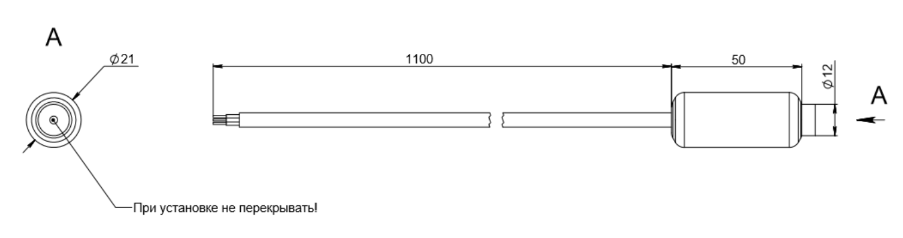 |
| Dimensional drawing |
LIMITATIONS
- The sensor is not intended for long-term (more than a month) underwater placement. Prolonged exposure to aggressive environments such as seawater leads to erosion of the protective compound on the working part of the sensor. The process is faster at elevated pressure and temperature.
- Foreign objects such as sand, silt, algae, etc. must not get into the sensor window. If foreign objects get into the sensor window, rinse it in fresh water. Mechanical cleaning is not allowed.