docs.unavlab.com
Main ❯ Navigation & tracking systems ❯ Zima-R, Zima2-R: Wiring diagram
ℹ Recommendations for printing / saving as PDF
- Press Ctrl+P (macOS: Cmd+P)
- Select "Save as PDF" (Microsoft Print to PDF) as the printer
- In "Pages", enter a range that excludes the first and the last page
- Disable headers and footers (title, URL, page numbers)
- In Chrome/Edge: More settings → "Margins" → None | in Firefox: "Margins & Header/Footer" → None
- Click Print and choose where to save the PDF
 |
|
|---|---|
| www.unavlab.com support@unavlab.com |
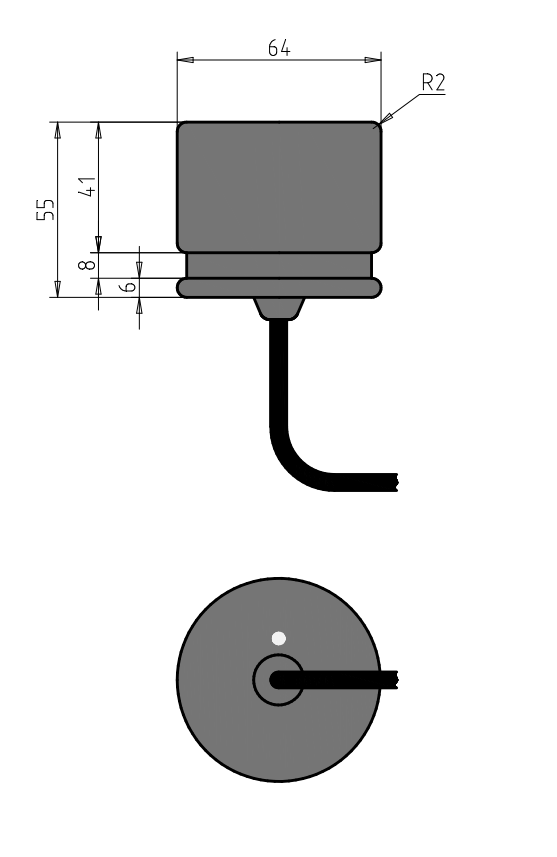
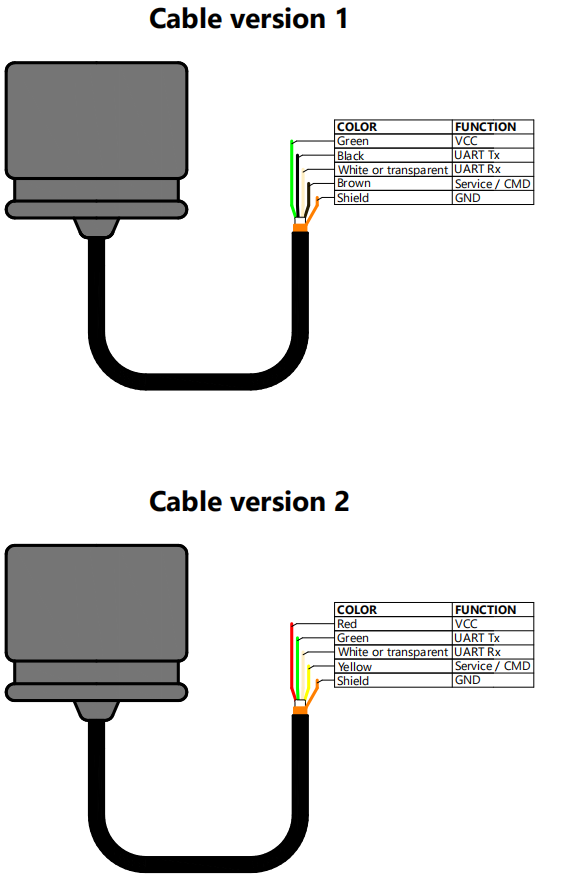
Zima-R, Zima2-R, Zima2-R35 Responder-beacon Cable wire assignment and dimensions |
CABLE WIRE ASSIGNMENT
DIMENSIONAL DRAWING