docs.unavlab.com
 |
 |
|---|---|
| www.unavlab.com support@unavlab.com |
RedPhone-D Diver station for underwater acoustic voice communication User’s manual |
RedPhone-D
Diver station for underwater acoustic voice communication
User’s manual
Contents
- 1. Description of the RedPhone-D station
- 2. Working with the device
- 3. Storage and maintenance
- 4. Obligations and disclaimer
1. Description of the RedPhone-D station
1.1. Purpose
The diver station for underwater acoustic voice communication RedPhone (hereinafter referred to as the station) is intended for wireless exchange of voice messages between divers, as well as between divers and the surface dive control point, equipped with diver communication devices that support the same signal parameters as the station.
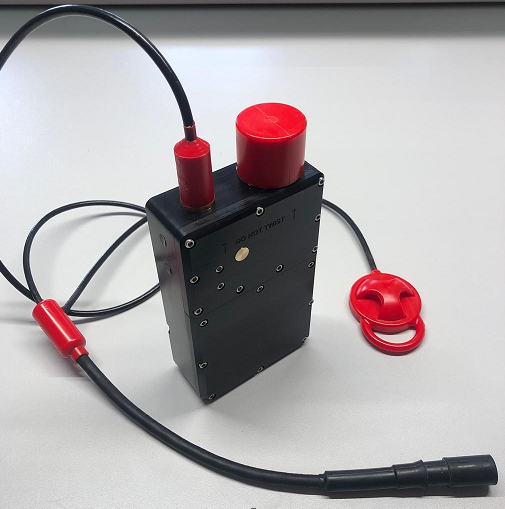
The general view of the RedPhone station is shown in Figure 1.
|
|---|
| Figure 1 - General view of the RedPhone station |
The device has a plastic housing with a serviceable battery compartment that holds 18650 rechargeable batteries.
The underwater acoustic transducer and a cable entry with a cable and a connector for a telephone headset with a PTT button are located in the upper part of the device housing. Versions are available both for headsets with a built-in PTT button and for headsets without one; in the latter case, the device is supplied with its own PTT button.
1.2. Controls and connectors
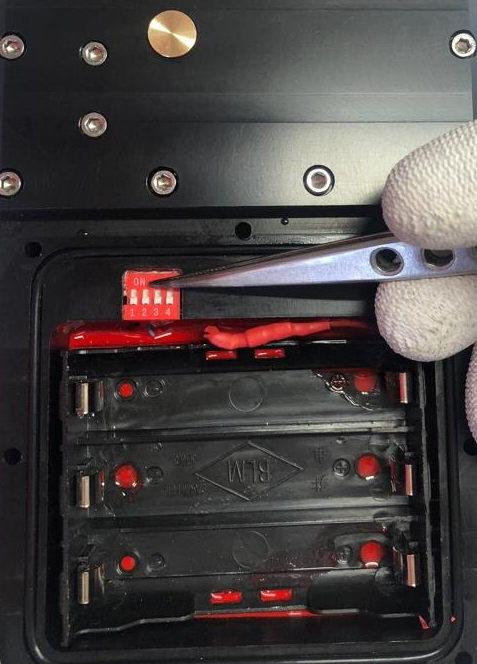
The device has no external controls and switches on automatically when it enters the water. Charging is performed with the supplied cradle (chassis) and charger. Channel switching and enabling the compatibility mode with the RWLT navigation tracking system are performed using a DIP-switch located in the battery compartment.
Figure 2 shows the location of the switch for the channels and the compatibility mode with the RWLT navigation system.
 |
|---|
| Figure 2 - Location of the switch in the battery compartment of the device |
Table 1 describes the functions of the switch sections.
Table 1 - Functions of the switch sections
| Section number | Function |
|---|---|
| 1 | RWLT navigation system compatibility mode |
| 2 | Communication channel selection - bit 2 |
| 3 | Communication channel selection - bit 1 |
| 4 | Communication channel selection - bit 0 |
1.3. Technical specifications
The station uses single-sideband amplitude modulation (SSB, Single side band) and supports the bands most commonly used in such systems, which ensures compatibility with almost all similar systems. Table 2 shows the correspondence of the station channel numbers to frequency bands.
Table 2 - Correspondence of the channel number, position of the switch sections and signal parameters
| Channel number | Bit 2 | Bit 1 | Bit 0 | Carrier frequency, Hz | Sideband | Bandwidth, Hz |
|---|---|---|---|---|---|---|
| 1 | 0 | 0 | 0 | 32768 | Lower | 28468 .. 32468 |
| 2 | 0 | 0 | 1 | 32768 | Upper | 33068 .. 37068 |
| 3 | 0 | 1 | 0 | 31250 | Lower | 26950 .. 30950 |
| 4 | 0 | 1 | 1 | 31250 | Upper | 31550 .. 35550 |
| 5 | 1 | 0 | 0 | 28500 | Lower | 24200 .. 28200 |
| 6 | 1 | 0 | 1 | 28500 | Upper | 28800 .. 32800 |
| 7 | 1 | 1 | 0 | 25000 | Lower | 20700 .. 24700 |
| 8 | 1 | 1 | 1 | 25000 | Upper | 25300 .. 29300 |
The general technical specifications of the device are given in Table 3:
Table 3 - Technical specifications
| PARAMETER | VALUE |
|---|---|
| DIMENSIONS1 (L x W x H) | 203 x 105 x 45 mm |
| WEIGHT2 (dry) | 1.55 kg |
| MAXIMUM IMMERSION DEPTH | 70 m |
| MAXIMUM ACOUSTIC COMMUNICATION RANGE3 | 1000 m |
| MAXIMUM ACOUSTIC SOURCE LEVEL | 150 dB re 1 μPa @ 1 m |
| VOICE BANDWIDTH4 | 300 .. 4300 Hz |
| NUMBER OF SUPPORTED CHANNELS | 8 |
| MAXIMUM BATTERY LIFE (RX MODE)5 | up to 80 hours |
| MAXIMUM BATTERY LIFE (MIXED MODE, 20%)5,6 | up to 5 hours |
| MAXIMUM BATTERY LIFE (MIXED MODE, 50%)5,7 | up to 2.5 hours |
| OPERATING TEMPERATURE RANGE | 0 .. 50 °C |
| POWER SOURCES USED | 3 x 18650 Li-Ion |
| CHANNEL SWITCHING | DIP-switch in the battery compartment |
| HOUSING MATERIAL | Delrin |
| CABLE INSULATION MATERIAL | Polyurethane |
| NAVIGATION SIGNAL CARRIER FREQUENCY8 | 20050 Hz |
| NAVIGATION SIGNAL MODULATION TYPE | BPSK |
| NAVIGATION SIGNAL DURATION | 200 ms |
1 Including the transducer.
2 With a battery, a PTT button and a mask connector; depending on the connector, the value may differ by the weight of the connector.
3 A parameter that determines the maximum range at which signal reception is possible, based on the electro-acoustic parameters of the transmitter and receiver, the spatial decrease in the intensity of sound energy, attenuation in the medium and the acoustic noise level.
4 The actual range of reproduced frequencies depends on the characteristics of the headset used.
5 With new, fully charged batteries with a capacity of 3000 mA*h or more, at an ambient temperature of 20 °C.
6 In the mode of 2 minutes of transmission and 8 minutes of reception.
6 In the mode of 5 minutes of transmission and 5 minutes of reception.
8 The function is provided by the buoys of the RWLT navigation system.
1.4. Delivery set
Table 4 - Delivery set
| No. | Name | Quantity | Notes |
|---|---|---|---|
| 1 | RedPhone station with a strap mount and a headset connector | 1 pc. | |
| 2 | Mains charger with a cradle | 1 pc. | |
| 3 | Spare parts and tools kit (bit for a hex nut, set of bolts and nuts) | 1 pc. |
2. Working with the device
2.1 Preliminary checks
Before immersing the device in water, the user must make sure that:
- the battery compartment of the device is screwed shut and watertight;
- a headset is connected to the connector (the connector is plugged in);
- the device is securely fastened with a strap to the tank (recommended mounting location) or to the diver’s belt.
Before starting work, the user must:
- check that the communication channels are selected correctly on all devices operating in the immediate vicinity, in accordance with sections 2.2.2 and 2.2.3..
2.2. Operation
Before operation, all the preparations and checks provided for in section 2.1 must be carried out.
Underwater acoustic voice communication with divers is half-duplex: transmission and reception alternate; while the device is in transmit mode, it cannot receive incoming messages.
2.2.1. Sound signals
The possible sound alerts are summarized in Table 5.
Table 5 - Sound alerts
| Alert description | What it signals |
|---|---|
| Short rising and then falling tone | The station is switched on |
| Short rising tone | Switch to receive mode (when the navigation function is off) |
| Short falling tone (~ every 30 seconds) | Low charge of the built-in power supply |
2.2.2. Receiving voice messages
To receive voice messages from divers, the PTT button on the headset must be released. Incoming messages are then played through the headset.
The volume of incoming voice messages depends on the distance between the station transducer and the diver and on the hydrological conditions. It may decrease when a diver enters an acoustic shadow zone (when elements of the underwater landscape, parts of structures, vessels, algae, etc. are in the signal path).
2.2.3. Sending voice messages
To send a voice message, perform the following steps:
- Press the PTT button on the headset;
- Pause briefly (~0.5 seconds) to let the station switch to transmit mode;
- Speak the voice message clearly, with distinct articulation; it is recommended to end the voice message with the word “Over!” to signal to the recipient that the message has ended;
- Pause briefly (~0.5 seconds);
- Release the PTT button;
- If the compatibility mode with the RWLT navigation system is disabled, the station emits a short beep, indicating that the device has switched to receive mode; if the compatibility mode with the RWLT navigation system is enabled, the station emits a navigation signal through the underwater acoustic transducer.
2.3. Shutdown
After operation, the diver station does not require any additional actions: it switches off automatically in air. Before placing the station in the transport case, rinse and/or desalinate it in fresh water, then wipe it with an absorbent cloth and let it dry in air for at least 30 minutes.
3. Storage and maintenance
3.1. Storage and maintenance conditions
The station has no special storage requirements, except for the following:
- Storage at a temperature from -20 °C to 60 °C;
- The headset connector must be disconnected;
- For long-term storage (more than a month), it is recommended to recharge the built-in power supply of the station;
- To remove contamination from the device housing and after working in seawater, rinsing in fresh water is necessary. A weak solution of household detergents may be used with the battery compartment cover closed; when rinsing, avoid getting moisture and/or detergents into the open headset connector;
- Bending the cables to a radius of less than 5 cm is not allowed;
- Applying torsional forces to the underwater acoustic transducer or the cable entry is not allowed;
- Before placing the device in the transport case, all moisture must be completely removed from it.
PROHIBITED:
- OPENING THE EQUIPMENT FROM THE DELIVERY SET LISTED IN section 1.4.
- ALLOWING PERSONS WHO ARE NOT FAMILIAR WITH THESE INSTRUCTIONS TO USE THE EQUIPMENT FROM THE DELIVERY SET LISTED IN section 1.4.
- ALLOWING PERSONS WHO HAVE NOT REACHED THE AGE OF MAJORITY TO USE THE EQUIPMENT FROM THE DELIVERY SET LISTED IN section 1.4.
3.2. Charging the built-in power supply
The built-in power supply of the station may be charged only with the supplied charger, with the headset connector disconnected. Before using the charger, read the charger’s operating instructions. To charge the device, place it in the charging cradle and connect the supplied charger to a household power outlet. The end of charging is shown by the indicator on the supplied mains charger.
3.3. Battery replacement
The device has a serviceable battery compartment that holds 3 Li-Ion 18650-size batteries. The battery compartment cover may be removed only by persons with the appropriate qualifications, and only to change the channel settings and/or to toggle the compatibility mode with the RWLT navigation system, as well as to replace the batteries at the end of their service life. Opening and closing the battery compartment frequently in order to quickly replace discharged batteries with charged ones is strongly discouraged: the user must monitor the state of charge of the batteries and charge them in a timely manner, especially before use.
To remove and install the battery compartment cover:
- place the device on a table, standing it on its narrow side, with the transducer pointing away from you;
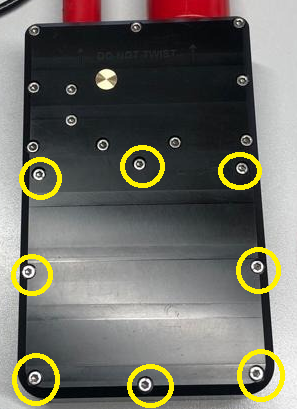
- using the supplied bit and a hex screwdriver h2.5 mm, loosen the 8 cover screws one by one (by 3–4 turns) (see Figure 3);
- completely unscrew the cover screws;
- remove the bolts and nuts, take off the cover;
- place the device horizontally;
- if necessary, carefully remove the batteries, prying them by the end with a flat non-conductive tool if necessary;
- if necessary, carefully install new batteries, observing the polarity;
- if necessary, configure the device using the switch;
- make sure that the sealing ring is intact and, if necessary, lubricate it with thick silicone grease;
- make sure that there are no foreign objects (debris, hairs, etc.) on the sealing ring and in the groove;
- install the battery compartment cover;
- insert the bolts;
- while pressing the cover down by hand, turn the device onto its edge and hand-thread 4 nuts at the edges of the cover;
- slightly tighten the nuts to prevent the sealing ring from slipping out;
- install the remaining nuts and tighten them completely so that no gaps remain between the cover and the housing.
 |
|---|
| Figure 3 - Location of the bolts of the battery compartment cover |
CAUTION!!!
It is strictly prohibited to turn any bolts or nuts on the device other than those that secure the battery compartment cover! This may cause the device to fail.
4. Obligations and disclaimer
4.1. Terms of replacement and free warranty service
The manufacturer’s warranty covers only factory defects that appear during operation of the device in accordance with this manual during the warranty period (2 years from the date of purchase).
The manufacturer guarantees free repair or replacement of faulty equipment from the delivery set that has failed due to a factory defect.
The grounds for refusing free warranty service, free repair and replacement include:
- any mechanical damage to the equipment from the delivery set specified in section 1.4., including damage to the insulation of wires and cables;
- any damage caused by exposure to moisture and contamination due to improper use of the equipment from the delivery set specified in section 1.4.;
- any electrical damage caused by the use of accessories not included in the delivery set (charger), or by the use of poor-quality and/or failed batteries; accessories supplied by the manufacturer or its representative to replace faulty or lost ones are not considered to be outside the delivery set;
- any traces of unauthorized repair and/or opening of the equipment from the delivery set specified in section 1.4..
4.2. Limitation of the manufacturer’s liability
ANY PARTS OF THE DELIVERY SET LISTED IN section 1.4., SEPARATELY AND AS PART OF A SYSTEM, HEREINAFTER REFERRED TO AS THE “SUPPLIED EQUIPMENT”:
- WERE NOT DEVELOPED AS A MEANS OF RESCUE
- WERE NOT TESTED AS RESCUE EQUIPMENT
- ARE NOT RESCUE EQUIPMENT
- THE MANUFACTURER DECLARES THAT THE SUPPLIED EQUIPMENT IS SAFE WHEN USED IN ACCORDANCE WITH THESE INSTRUCTIONS AND IS NOT RESPONSIBLE FOR ANY CONSEQUENCES OF THE USE OF THE SUPPLIED EQUIPMENT